Member - Email Settings |
Q: How do I set my email settings?
A: Every SCAUG member can set email subscription preferences. To see your email subscription preferences go to your member profile and click on Subscriptions link.
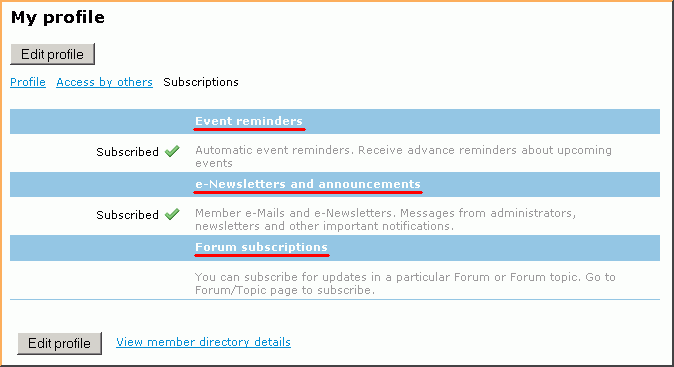
By default, there are two main email preferences:
- Event reminders - controls automatic event reminders such as new event announcements and event reminders that are sent to registered attendees
- e-Newsletters and announcements - as the name suggests, for e-newsletters and member emails. Messages from administrators, newsletters and other important notifications.
By default, every new member will have these preferences set to on. Forum subscription preference will only appear if a member has already subscribed to the forum updates.
How to subscribe/unsubscribe
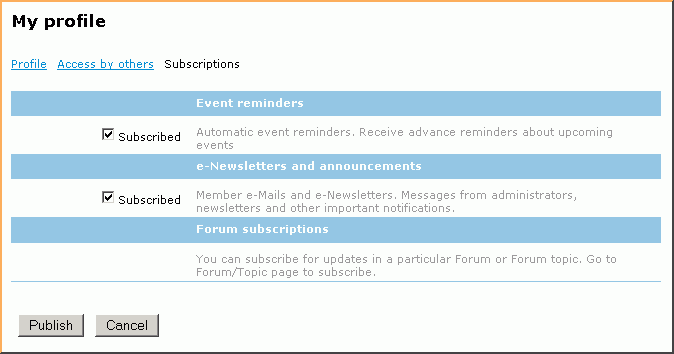
Member can opt out any of this options by clicking on Edit profile button and removing the checkmarks. Be sure click [Publish] icon in order to save changes.
SCAUG is a not for profit organization dedicated to benefit users of ESRI’s geographic information software | Founded in 1990 | © SCAUG 2019 | | South Central Arc Users Group P.O. Box 96 Ardmore, OK 73402 |